
Outsourcing a Website Redesign Without Losing Your SEO Rankings
- August 14, 2026
-
365admin2015
- Outsourcing
 6 mins read
A website redesign is one of the riskiest moments in a site's life for SEO — not because a new design hurts rankings, but because redesigns routinely break the technical foundation rankings depend on. Most redesign-related traffic loss traces back to missing or mismapped 301 redirects, not the new design itself. Handled properly, a redesign can be completed with rankings fully intact, or even improved. Handled carelessly, the damage can be severe: one commonly cited case saw traffic fall by a factor of ten within ten days of a redesign that skipped redirect planning, taking over a year to recover. Here's how to outsource a redesign without that outcome.
Website redesign SEO is essential when rebuilding or significantly updating an existing website. A redesign can improve usability, performance, branding, and conversions, but changes to URLs, content, navigation, internal links, and technical structure can also affect organic visibility. Planning SEO alongside the redesign helps businesses protect existing rankings while creating a better website experience.
When the project is outsourced, the redesign should involve more than changing the visual appearance of the website. The website design services process needs to work alongside the technical development and SEO requirements of the existing site. Businesses considering outsourcing can also look at dedicated web design outsourcing services when they want design work handled as part of a broader external team.
Website Redesign SEO Checklist: Why Redesigns Break Rankings
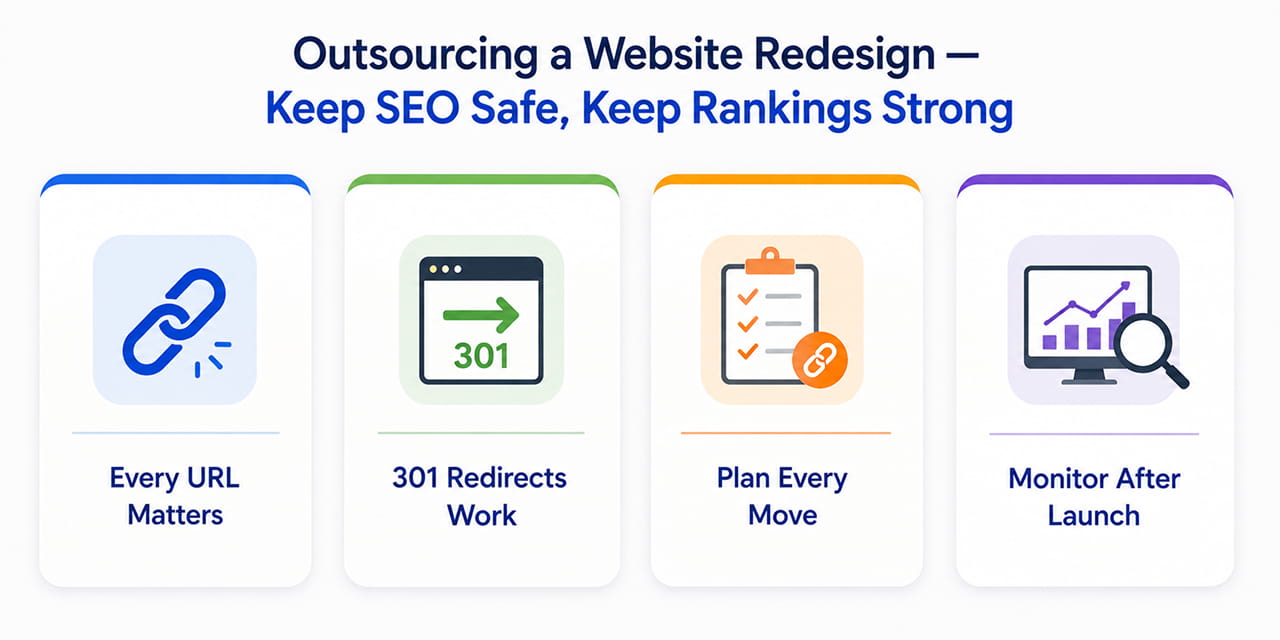
Search engines rank specific URLs, not just domains or brands. When a redesign changes URL structures, merges or removes pages, or migrates to a new platform, every one of those URLs — along with the backlinks, rankings, and authority attached to it — is at risk unless it's explicitly accounted for. The good news is that modern search engines transfer ranking value through 301 redirects far more effectively than older SEO folklore suggests: Google's current site migration guidance explains how businesses should prepare the new site, map existing URLs to their new destinations, implement redirects and monitor the site after launch.
A redesign also needs a strong technical foundation underneath the new interface. This is where website development services become important, particularly when the redesign involves a new CMS, new URL structure, new functionality or significant changes to the site's architecture.
Step 1: Audit Every Existing URL Before Anything Changes
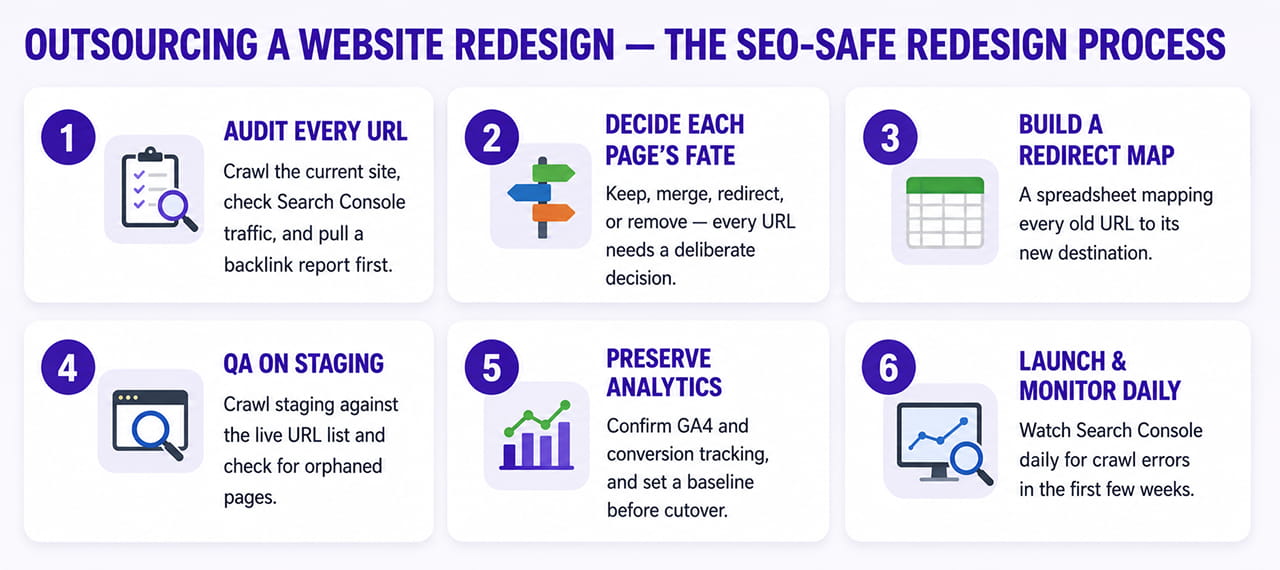
Before a single design decision is made, crawl the current site and produce a complete inventory of every indexed URL, using a tool like Screaming Frog or Sitebulb. Cross-reference this list against Google Search Console to confirm which pages are actually driving organic traffic, and pull a backlink report from a tool like Ahrefs or Semrush to identify which URLs have earned external links. Backlinks are a genuinely scarce asset — a large majority of pages on the web have none at all — so the pages that do have them deserve special protection during a migration.
Step 2: Decide What Happens to Each Page
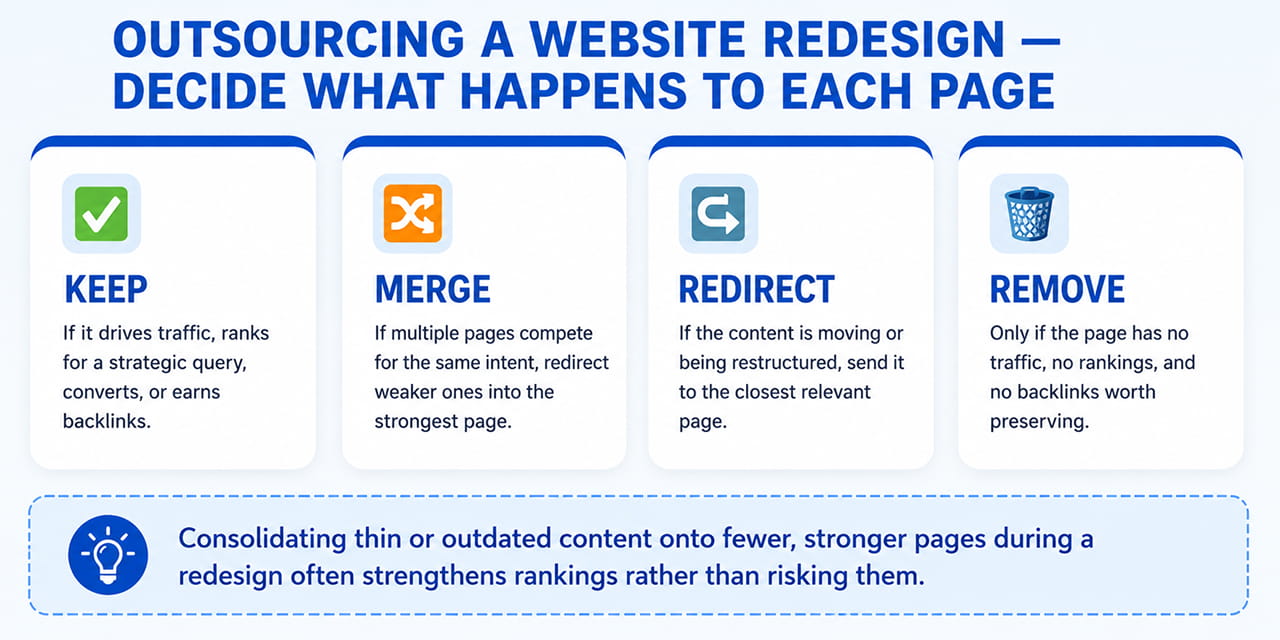
Not every page should simply move to an equivalent new URL. For each page in the audit, the decision generally falls into one of four categories: keep it if it drives traffic, ranks for a strategic query, converts, or earns backlinks; merge it if multiple pages compete for the same search intent, redirecting the weaker ones into a single strongest page; redirect it to the closest relevant page if the content itself is moving or being restructured; or remove it cleanly, returning a proper "not found" status, only if it has no traffic, no rankings, and no backlinks worth preserving. Many older sites accumulate a large share of thin or outdated content over the years — consolidating that content onto fewer, stronger pages during a redesign often strengthens rankings rather than risking them.
Step 3: Build a Complete Redirect Map
This is the single most important artifact in an SEO-safe redesign: a spreadsheet mapping every old URL to its new destination, with the intended redirect type (almost always a 301 for permanent moves). Google's site-migration documentation specifically recommends preparing a URL mapping from current URLs to their corresponding new destinations and configuring redirects from the old URLs to the new ones. Google also advises against redirecting many unrelated old URLs to one destination such as the homepage, because irrelevant redirects can confuse users and may be treated as soft 404s.
The guiding principle is one page per search intent — redirecting a specific product or service page to your homepage instead of its closest actual equivalent dilutes relevance and can be treated by search engines as a soft error rather than a genuine move. Every URL identified as having backlinks in Step 1 needs an explicit, verified entry in this map; nothing earning external links should be left to redirect by default or omitted by oversight.
Step 4: QA the Redirect Map on Staging Before Launch
Once the new site is built on a staging environment, crawl it against the live site's URL list to confirm every mapped redirect actually works, and specifically check for orphaned pages — pages with no internal links pointing to them — since these are easy to miss and a common source of post-launch traffic loss. This is also the point to confirm Core Web Vitals and page speed on the new templates, verify mobile rendering, and check that structured data and metadata carried over correctly rather than reverting to generic defaults.
Step 5: Preserve Analytics Continuity
Before cutover, verify that GA4 tracking, conversion goals, and any event tracking are correctly configured on the new site — losing this data isn't an SEO risk exactly, but it blinds you to whether the redesign is actually working once it's live, at precisely the moment you need that visibility most. Set a baseline of current rankings, organic traffic, and conversions in Search Console and GA4 before launch, so any post-launch dip is measurable against a real number rather than a guess.
Step 6: Launch and Monitor Daily for the First Few Weeks
For most sites, a single cutover — one DNS switch, one complete set of redirects going live at once — is cleaner than a phased rollout, since it avoids maintaining two parallel URL structures during a transition. In the days immediately after launch, monitor Google Search Console daily for crawl errors, indexing issues, and any pages returning unexpected statuses. Google recommends monitoring traffic and search indexing after a site move and notes that temporary ranking fluctuations can occur while Google recrawls and reindexes the site. Most lasting SEO damage from a redesign is preventable in this window — it comes from redirect problems that go unnoticed for weeks, not from anything inherent to launching a new design.
What to Ask an Outsourced Redesign Partner
If a redesign is being outsourced, a few questions during vendor evaluation reveal whether SEO continuity is actually part of their process: Do they perform a full URL and backlink audit before design work starts? Do they produce and share a redirect map for your review before launch, rather than handling it invisibly? Do they crawl staging against the live site before cutover? And do they commit to post-launch monitoring, or does their involvement end at the deployment date? A partner who treats these as standard steps, not extras, is the one least likely to turn a redesign into a ranking-recovery project.
A website redesign doesn't have to cost you rankings — the businesses that come through a redesign with traffic intact are simply the ones that treated the migration itself as seriously as the new design. Audit before you build, map every redirect deliberately, QA it before launch, and monitor closely in the weeks after. Skipping any one of those steps is where nearly all redesign-related SEO damage actually comes from.
LET'S TALK: OUTSOURCE YOUR WEBSITE REDESIGN WITHOUT LOSING YOUR SEO RANKINGS
Outsourcing a website redesign doesn't have to mean sacrificing the rankings, traffic, and authority your existing website has built. The key is choosing a partner that treats SEO continuity as part of the redesign process—not something to address after the new website goes live.
A successful SEO-safe redesign starts with understanding your existing website before making changes. Every important URL, backlink, ranking, redirect, page, and technical SEO element needs to be accounted for before development begins. When your redesign partner combines website design, development, and SEO requirements from the start, you can modernize your website while protecting the search visibility you've worked hard to build.
At Outsourced365, we help businesses outsource website redesign projects with SEO continuity built into the process. Our team helps businesses:
- audit existing URLs, rankings, organic traffic, and backlinks before redesign begins
- determine which pages should be retained, consolidated, redirected, or removed
- create a complete 301 redirect map before the new website launches
- test redirects, orphaned pages, metadata, structured data, mobile performance, and Core Web Vitals on staging
- preserve GA4, Search Console, conversion tracking, and other essential analytics
- launch the redesigned website with a structured SEO migration process
- monitor indexing, crawl errors, rankings, traffic, and performance after launch
From the initial URL and backlink audit through redesign, development, redirect testing, launch, and post-launch monitoring, we help businesses outsource website redesign without turning a successful SEO presence into a ranking recovery project.
Ready to redesign your website without putting your SEO rankings at risk? Get in touch through our contact form, and we'll show you how a structured redesign and migration process can help you build a modern, high-performing website while protecting the SEO value you've already earned.
Outsourced365 Services are designed to help you grow
Contact us Today!
Why Companies Build Websites with Outsourced365
With our web design services, you will get:
- Modern, conversion-focused layouts
- Responsive design across all devices
- Optimized user experience and navigation
- Scalable websites built for growth

Related Posts
See all posts