Google Ads Just Started Accepting Unmasked Customer IP Addresses — Here's the Catch
- October 13, 2026
-
365admin2015
- Uncategorized
 4 mins read
If you use Customer Match — the Google Ads feature that lets you upload your own customer list to build targeting audiences — a real change just landed, and it's worth understanding before you touch your next upload file. Google has added two new fields to the system, and one of them comes with a compliance requirement that's easy to miss if you're not looking closely.
What Actually Changed
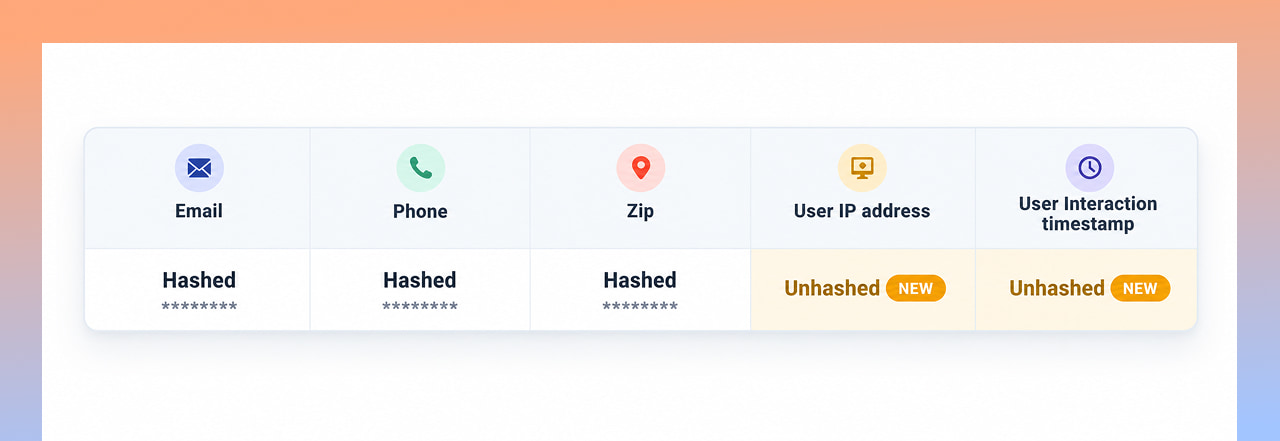
According to Search Engine Land's report on the update, Google's Help Center page for building a Customer Match file upload now lists two new column headers: User IP address and User Interaction timestamp. These join the existing fields advertisers could already upload — email, phone, name, and mailing details — as additional signals Google Ads can use to match your customer records to real accounts.
In plain terms: alongside the customer information you already had, you can now tell Google Ads "this customer also interacted with us from this specific IP address, at this specific time," and Google will use that as another way to find and target that same person.
The Detail Every Advertiser Needs to Notice
Here's where this update becomes genuinely different from a routine feature addition. Personal details in a Customer Match upload — email addresses, phone numbers and names — get hashed, meaning it's scrambled into a code that isn't readable as plain personal data in transit. IP addresses and timestamps are the exception. Google's documentation is explicit that these two fields must be uploaded unhashed — as plain, readable text.
That's a meaningfully different data-handling requirement sitting inside the same upload file as your hashed customer data, and it's easy to miss if you're just reusing an old upload template without reading the fine print on the new columns.
Where This Doesn't Apply
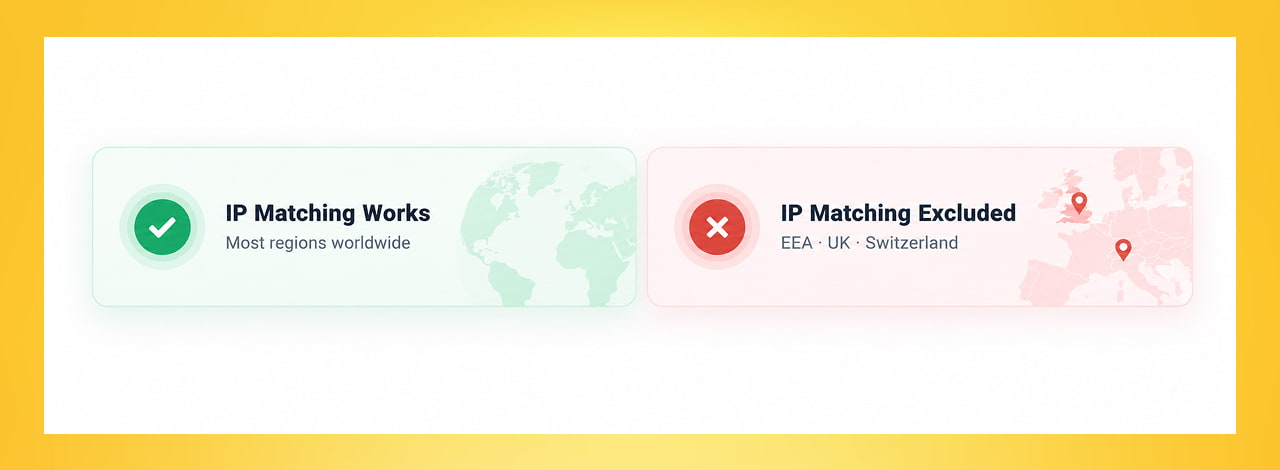
Google has also built in a significant regional restriction. IP matching is not supported for end users located in the European Economic Area, the UK, or Switzerland. Since a timestamp can't be uploaded without an accompanying IP address, that restriction effectively closes off the timestamp field for those users too. If your customer list includes contacts from those regions, this feature simply won't apply to that portion of your list — Google's matching system is built to exclude them automatically from IP-based matching.
How the Timestamp Actually Works
The timestamp isn't just a formality — it solves a real problem. The same IP address can belong to different people at different times (think shared office networks, family devices, or public Wi-Fi). Google's documentation notes that if you upload an IP address without a timestamp, the system defaults to matching it to the "latest known" user of that IP — which is a reasonable fallback, but a less precise one than pairing the IP with the exact moment your customer actually interacted with your business.
What This Means for Your Account, Practically
- Treat the IP and timestamp fields as optional additions, not a requirement. You can still upload email, phone, and mailing data exactly as before — these new fields are additive, not mandatory.
- If you do start using IP matching, update your privacy documentation accordingly. Because this data goes to Google unhashed, it's a more sensitive data-handling change than your typical Customer Match upload, and it's worth having your data handling reviewed with that in mind.
- Segment your customer list by region before uploading, if you have contacts based in the EEA, UK, or Switzerland — since IP matching won't apply to them regardless, there's no benefit to including that data for those rows.
- Include timestamps whenever you include an IP address, rather than relying on the "latest known user" fallback, for more accurate matching.
- Don't rush to adopt this immediately if you're not already comfortable with your current Google Ads targeting setup. This is a genuinely useful enhancement for advertisers with a mature first-party data pipeline, but it's not something every account needs to rush into.
Why This Is Worth Paying Attention To Now
Customer Match has quietly become one of the more powerful tools in Google Ads precisely because it's built on data advertisers already own, rather than third-party tracking that's becoming harder to rely on. Adding IP and timestamp signals is part of a broader pattern: as privacy restrictions tighten across the industry, Google is leaning more heavily on advertiser-supplied, first-party data to keep audience targeting accurate. Understanding exactly how that data needs to be formatted — and where it legally can't be used — is going to matter more, not less, over the next few years.
Quick Takeaways
- Google Ads' Customer Match now accepts IP addresses and interaction timestamps as new matching signals, alongside existing fields like email and phone.
- Unlike other Customer Match fields, IP addresses and timestamps must be uploaded unhashed — as plain, readable data — which carries different privacy handling implications.
- IP matching is not available for end users in the EEA, UK, or Switzerland, and timestamps can't be sent without an accompanying IP address.
- An IP uploaded without a timestamp defaults to matching the "latest known" user of that address, which is less precise than including the exact interaction time.
- These new fields are optional additions to your existing upload — not a requirement to change how you already use Customer Match.
Want Help Reviewing Whether This Update Fits Your Account?
New first-party data features are only useful when they're set up correctly and used within the right compliance boundaries. Reach out through our contact form and we'll help you figure out whether IP matching makes sense for your Customer Match strategy.
Outsourced365 Services are designed to help you grow
Contact us Today!
Why Companies Build Websites with Outsourced365
With our web design services, you will get:
- Modern, conversion-focused layouts
- Responsive design across all devices
- Optimized user experience and navigation
- Scalable websites built for growth

Related Posts
See all posts