
Google Ads Smart Bidding Can Now Help You Make Profit From Your Ads
- November 10, 2026
-
365admin2015
- Uncategorized
 5 mins read

Many advertisers set a Target ROAS in Google Ads Smart Bidding by guessing. Google Ads now has a calculator that helps you pick one based on your profit margin, so your Google Ads Target ROAS actually lines up with making money. It is already live, and we can see it inside our own Google Ads account. Our digital marketing team explains how it works in plain language.
One clear note first: this calculator helps you choose a smarter target. It does not make Google bid for profit. We explain the difference below.
What Is New?
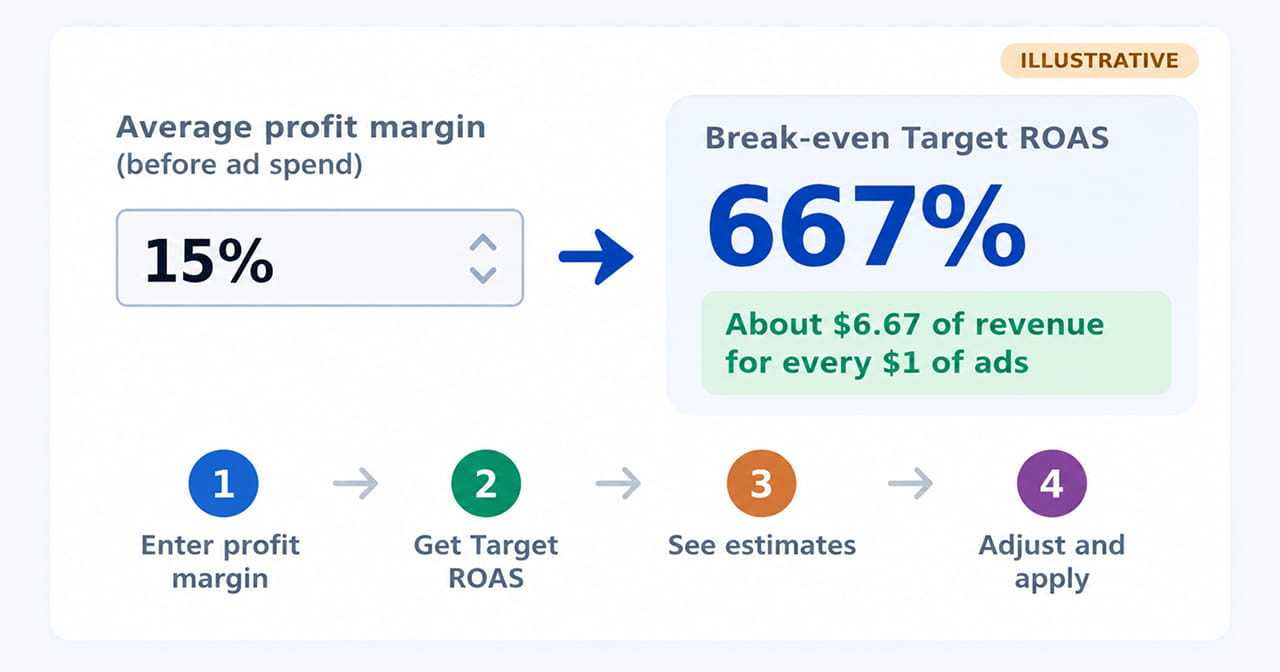
Here is how it works:
- You enter your campaign’s average profit margin, excluding ad spend.
- Google calculates a Target ROAS from that margin.
- Google shows weekly estimates for the target you pick: expected clicks, revenue, ad spend and total profit.
- You can adjust the target, watch the estimates change and then apply it to the campaign.
If you do not know your margin, the tool includes a short set of questions to help you work it out.
Check This Before You Switch It On
There is one condition to meet first. When you choose Target ROAS in a campaign’s bidding settings, Google Ads shows this warning:
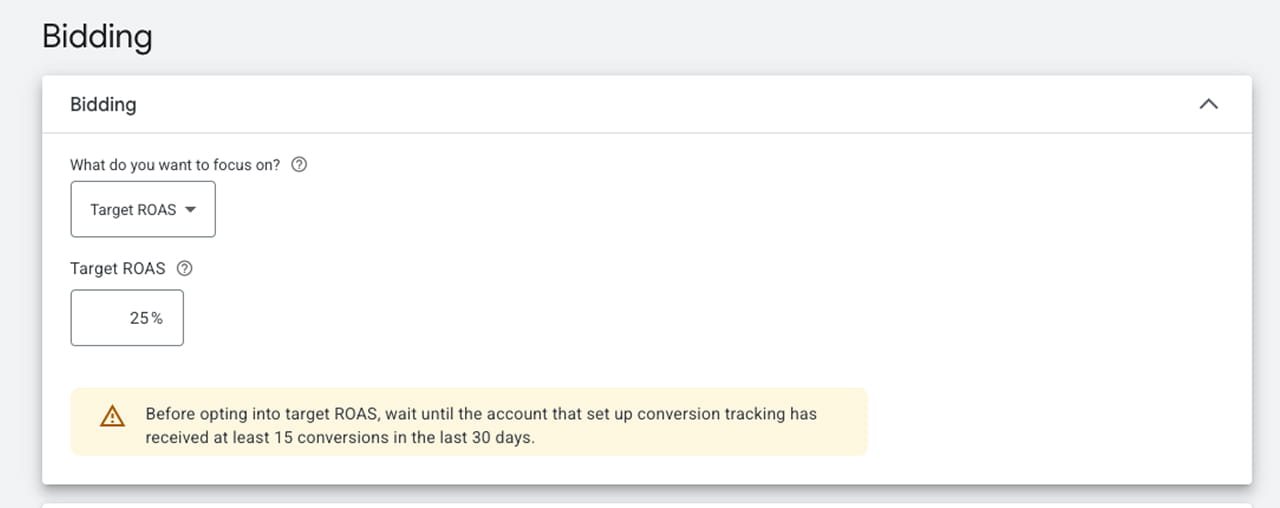
Google’s own warning in the bidding settings: wait for at least 15 conversions in the last 30 days.
A conversion is an action you count as a win, such as a sale, a sign-up or an enquiry form. Smart Bidding learns from these. With fewer than 15 conversions in the last 30 days, it has too little data to judge which clicks are likely to pay off, so its bids can swing and your results can suffer.
So if your account is below that number, build up your conversions first. Come back to Target ROAS, and this calculator, once you clear it.
First, What Is ROAS?
Google Ads Smart Bidding means Google’s automated bidding tools, which set bids for each auction. It is simply the revenue you earn divided by the money you spend on ads.
- Spend $100 and earn $400 in sales: ROAS is 4, which Google Ads shows as 400%.
- Target ROAS is a Smart Bidding setting where you tell Google the return you want, and its automated bidding tries to hit it. (Smart Bidding means Google’s automated bidding tools.)
Why Profit Margin Changes Everything
A 400% ROAS sounds great, but it depends on your margin. Here is the math from the report’s example:
- Your profit margin is 15% before ad spend.
- On a $100 sale you keep $15 before paying for ads.
- If you spend more than $15 on ads to make that sale, you lose money.
- So you need $100 ÷ $15 = about $6.67 of revenue for every $1 of ads. That is a 667% Target ROAS, the break-even point.
At break-even you make no profit. To earn something, your target needs to be higher than the break-even figure.
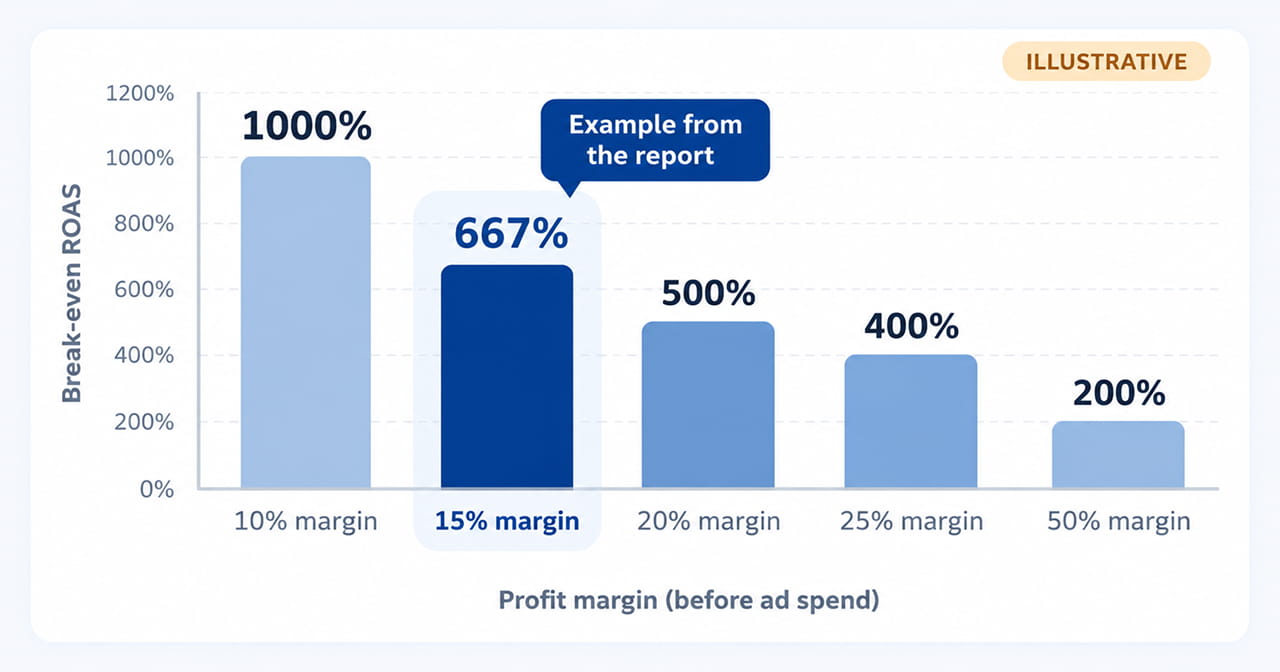
Break-even ROAS is 100 divided by your margin. A smaller margin needs a much higher ROAS.
This is why a campaign can look strong yet lose money. A 400% ROAS is profitable at a 50% margin but loses money at a 15% margin.
What This Tool Does Not Do
Search Engine Land’s report is careful here, and we should be too:
- Google is not directly bidding for profit. The tool links your bidding target to the point where advertising makes financial sense. That is useful, but different from profit bidding.
- It is only as good as your margin number. In the report’s words, “Average margins can hide major differences between products, customers and orders.”
- It does not cover everything. Shipping, returns, payment fees and overhead can change true profitability, and the calculation does not include them.
- Some details are still unclear. Google has not published which campaign types support it or whether it uses product cost data.
How to Use the Idea Today
The calculator does the math for you, but it pays to understand it so you can sanity-check its suggestion:
- Find your real margin for the product or service, after costs, before ad spend. Include shipping, returns and payment fees if you can.
- Work out break-even ROAS: 100 ÷ margin percentage. At 20%, that is 500%.
- Set your target above break-even so there is profit left over.
- Split by product when margins differ. A high-margin product and a low-margin one should not share the same target.
- Review monthly. Margins change when prices, costs or shipping rates change.
A Word on Your Website
Your return also depends on what happens after the click. Slow pages, confusing checkouts and weak product pages quietly raise your cost per sale. A clean web design and a fast development setup can lift your results without spending more on ads.
Quick Takeaways
- Google Ads now has a live Target ROAS calculator based on your profit margin.
- Google Ads Smart Bidding needs enough data first, so Google recommends at least 15 conversions in the last 30 days before switching to Target ROAS.
- You enter your average profit margin excluding ad spend, and Google suggests a target and shows weekly estimates.
- Break-even ROAS equals 100 divided by your margin, so a 15% margin needs about 667%.
- It does not make Google bid on profit directly, and it ignores costs like shipping and returns.
- Check the math by hand too, and keep your margin figure honest.
Let’s Talk: Set a Target ROAS That Actually Makes You Money
Your campaign can show a healthy ROAS while quietly losing money on every sale. If your target is a guess, or set without knowing your real profit margin, Smart Bidding chases the wrong number, and your ad spend can grow faster than your profit.
At Outsourced365, we help businesses set Google Ads targets based on real numbers, not guesswork. From working out your true margin to checking whether your account is ready for Target ROAS, our team can help make sure your ad spend is working toward profit, not just revenue.
We can help you:
- Work out your real profit margin, including shipping, returns and payment fees
- Calculate the break-even ROAS for each product or service
- Check whether your account has the 15 conversions in 30 days that Target ROAS needs
- Review and fix conversion tracking so Smart Bidding learns from accurate data
- Set up and test Google’s profit-margin Target ROAS calculator in your account
- Split campaigns by product when margins differ
- Review targets every month as prices and costs change
- Improve landing pages and checkout speed so more clicks turn into sales
If your ad spend keeps rising but your profit does not, don’t keep guessing at your targets. Get in touch with Outsourced365 through our contact form and let’s set a Target ROAS that works for your margins.
Outsourced365 Services are designed to help you grow
Contact us Today!
Why Companies Build Websites with Outsourced365
With our web design services, you will get:
- Modern, conversion-focused layouts
- Responsive design across all devices
- Optimized user experience and navigation
- Scalable websites built for growth

Related Posts
See all posts