
Google Just Updated Its Location Asset Rules for Ads — What Multi-Location Businesses Need to Check
- September 18, 2026
-
365admin2015
- Outsourcing
 4 mins read
If your business runs Google Ads across more than one location — say, two clinics, three showrooms, or a chain of retail stores — you've probably seen your address, hours, and ratings show up right inside your ads. That's powered by a feature called location assets, part of how Google Ads is managed — and Google just updated the rules around it.
Google Ads location assets are important for businesses that advertise across multiple physical locations, and Google's September 2026 update to its Location asset requirements gives advertisers another reason to review their setup. The update clarifies terminology, improves the policy documentation, and adds troubleshooting guidance. Multi-location businesses should check how their locations are connected to Google Ads, whether their location information is accurate, and whether the locations being used in campaigns match the business and services advertised.
Before you panic: this isn't a new policy, and nothing is being enforced differently. But the update is still worth ten minutes of your time, especially if you manage ads for more than one location. Here's what changed and what to actually check.
First, What Are Google Ads Location Assets?
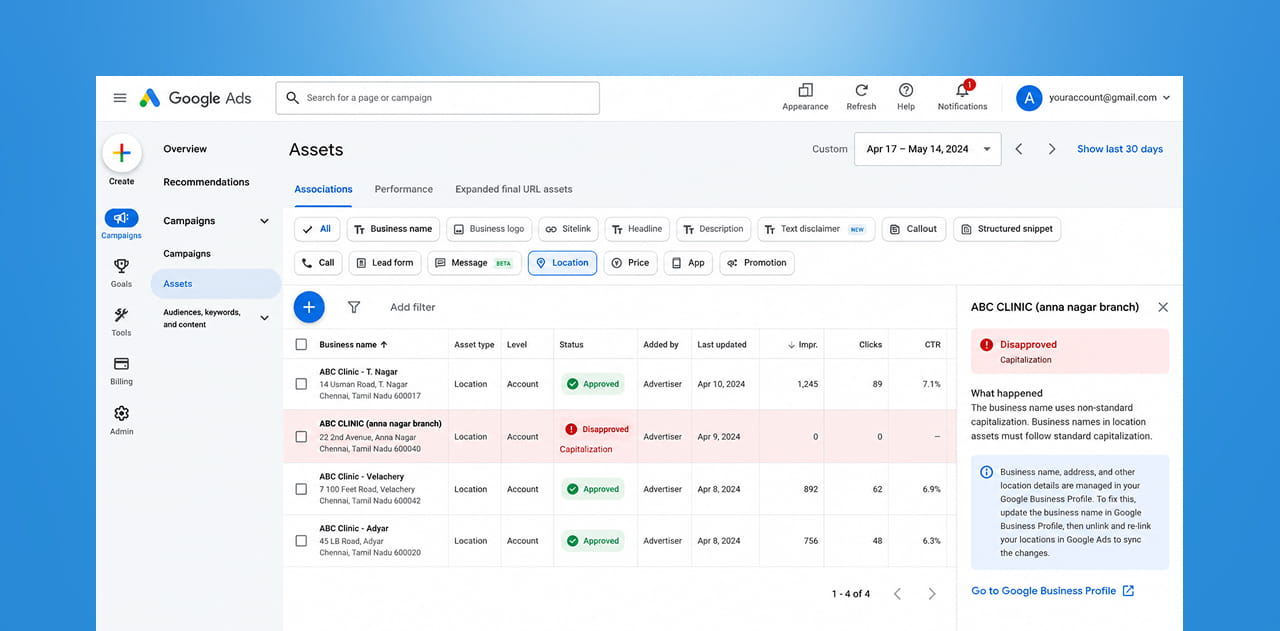
If you're not deep in Google Ads terminology, here's a simple explanation: location assets are the little extra pieces of information — your address, phone number, opening hours, star rating, and a map pin — that Google can attach to your ad automatically. They used to be called "location extensions," but Google renamed most of these add-ons to "assets" a while back.
The information doesn't come from inside Google Ads directly — it's pulled from your Google Business Profile (the free listing that shows up on Google Maps and in local search results). So if your Business Profile is accurate, your ads should automatically show accurate location details too.
For a business with multiple branches, this is what allows a single ad to intelligently show the nearest location to whoever is searching — genuinely useful, but also something that can quietly break if the underlying data isn't clean.
What Actually Changed
Google updated its official Location asset requirements page, and by its own account, the update was about clarity, not new rules. Specifically, Google:
- Cleaned up outdated terminology — old references to "extensions" have been replaced with the current term, "assets," to match how Google Ads is structured today.
- Added clearer troubleshooting steps for a common, frustrating problem: a location asset getting disapproved because of capitalization, punctuation, or symbols in the business name.
- Clarified that if this kind of disapproval happens, the fix isn't inside Google Ads at all — you have to correct it in your Google Business Profile (using standard title case, no unnecessary symbols), and then unlink and re-link that profile inside Google Ads so the correction actually syncs through.
Google has been explicit that this is not a new policy and doesn't change how strictly the rules are enforced. It's essentially Google rewriting its own instructions to be easier to follow — but the instructions themselves point to a genuinely useful thing for multi-location businesses to double-check.
Why Multi-Location Businesses Especially Should Pay Attention
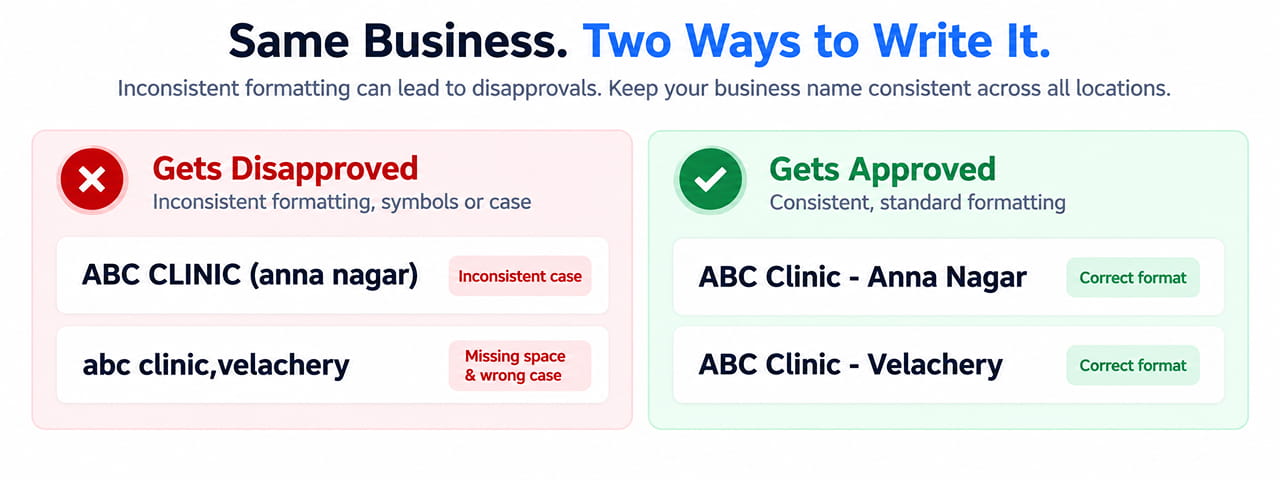
If you only have one location, this is a five-minute check. If you manage several, a few small issues can multiply quickly:
- Inconsistent formatting across locations is a common, invisible problem. One branch might be listed as "ABC Clinic - Anna Nagar" and another as "abc clinic (Anna nagar branch)" — small inconsistencies like this are exactly the kind of thing that can trigger a disapproval under these clarified rules.
- A disapproved location asset doesn't just look bad — it can mean that branch's ads stop showing the address, hours, and map pin entirely, which for a local business often means losing the exact details that convince someone to actually walk in.
- The fix isn't obvious if you don't know where to look. Since the correction has to happen in Google Business Profile — not Google Ads itself — it's an easy step for a busy team to miss, especially if different people manage your ads and your Business Profile listings.
What to Actually Check This Week
- Open Google Business Profile for each of your locations and check that business names follow consistent, standard formatting — proper title case, no stray symbols, no all-caps branches sitting next to normal-case ones.
- Cross-check against your Google Ads account — go into Campaigns, then Assets, and confirm every location is showing up correctly, with no disapprovals sitting quietly in the background.
- If you find a disapproved location asset, fix the underlying business name in Google Business Profile first, then unlink and re-link the profile inside Google Ads so the correction actually takes effect — editing it only in Ads won't work.
- If you manage locations through a Business Profile group (multiple branches under one login), do a quick pass across all of them rather than assuming a fix on one location has applied everywhere.
- Build this into a recurring check, not a one-time fix — new locations, rebrands, or small edits to a listing can reintroduce the same issue later. This is exactly the kind of ongoing task a website and account maintenance service is built to catch before it costs you visibility.
Quick Takeaways
- Google updated its Location asset requirements for clarity, not enforcement — this isn't a new policy, but it's worth reviewing.
- Location assets (address, hours, map pin, rating) are pulled from your Google Business Profile, not entered directly in Google Ads.
- A common cause of disapproval is inconsistent formatting in business names — capitalization, punctuation, or symbols.
- The fix must happen in Google Business Profile first, then be re-synced by unlinking and re-linking it inside Google Ads.
- Multi-location businesses should audit every branch's listing, not just assume one fix applies everywhere.
Want a Quick Health Check on Your Multi-Location Ad Setup?
Small inconsistencies across locations are easy to miss until an ad quietly stops showing your address or hours. Reach out through our contact form and we'll review your location assets across every branch.
Outsourced365 Services are designed to help you grow
Contact us Today!
Why Companies Build Websites with Outsourced365
With our web design services, you will get:
- Modern, conversion-focused layouts
- Responsive design across all devices
- Optimized user experience and navigation
- Scalable websites built for growth

Related Posts
See all posts