
Google Confirmed a Search Console Bug Scared Businesses Over Nothing — How to Tell a Real Problem From a False Alarm
- September 25, 2026
-
365admin2015
- Uncategorized
 5 mins read
A Search Console bug caused one of the most needless business panics of 2026. In mid-August 2026, a lot of business owners and marketing teams opened Google Search Console — the free tool Google gives you to see how your website is performing in search — and panicked. Their numbers had dropped, seemingly out of nowhere.
Google later confirmed what many suspected: it wasn't a real decline at all. It was a bug. Specifically, a logging error between August 13 and August 17, 2026 caused Search Console to under-report impressions in the "Generative AI"
performance report — the part of Search Console that shows how often your site shows up inside AI-generated answers like AI Overviews.
Nothing had actually changed about how your business was performing. The tool measuring it had simply broken.
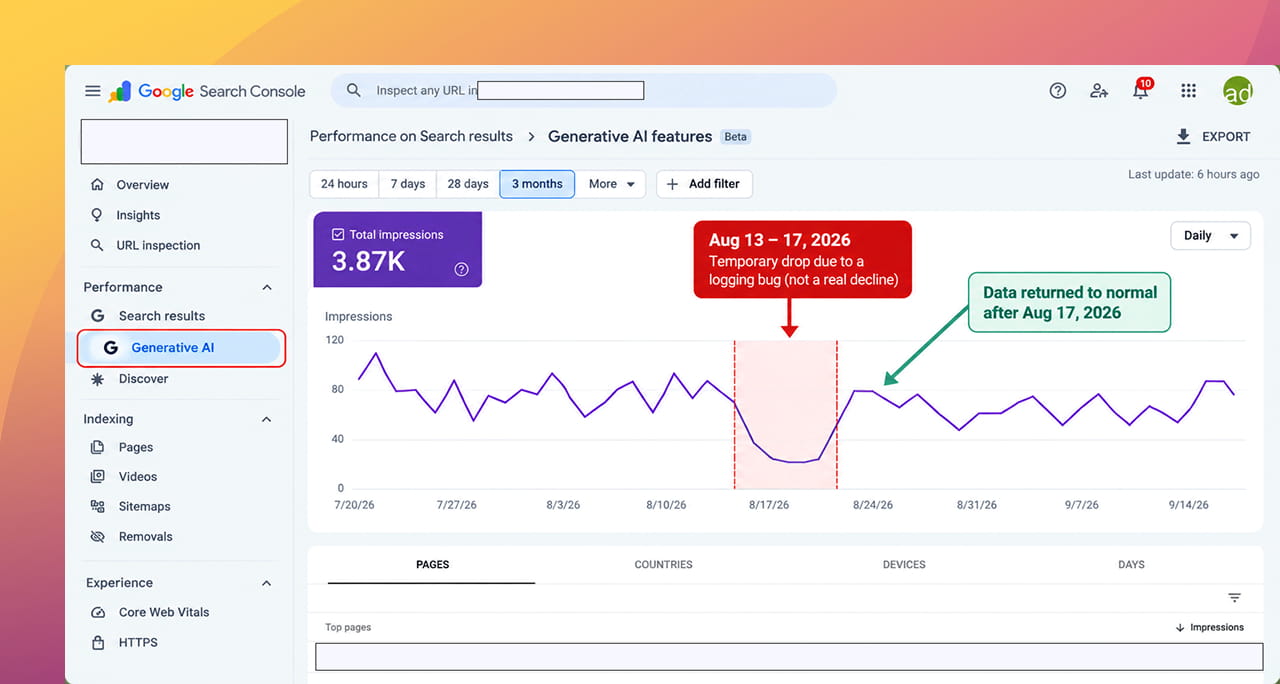
This isn't even the only Search Console bug of 2026 — a separate, longer-running issue had been over-reporting impressions for almost a year before that. Between the two, it's been a confusing year for anyone trying to read their search performance numbers. Which raises a genuinely useful question: how do you tell a real problem from a false alarm the next time your numbers move?
First, What Is Search Console (In Plain Terms)?
If you've never used it directly, Search Console is basically Google's own dashboard showing you exactly how your website performs in its search results — how many times you appeared (impressions), how many people clicked through, your average position, and which search terms brought people to you. It's free, it's official, and it's the closest thing to "ground truth" data most businesses have about their Google visibility.
Because it's treated as such a trustworthy source, when its numbers move sharply, people tend to believe it immediately — which is exactly why a bug like this one caused so much unnecessary worry.
Why This Search Console Bug Was So Easy to Believe
A drop in visibility is a business owner's nightmare scenario, and this bug's timing made it especially convincing:
- It affected the Generative AI report specifically — a newer, less familiar part of Search Console that businesses are still learning to interpret, making an odd-looking number easier to believe.
- It came at a time when AI-driven search (AI Overviews, AI Mode) is genuinely reshaping how visibility works, so a real decline wouldn't have seemed far-fetched.
- The drop looked sudden and sharp — exactly the kind of pattern that triggers a "something is broken" instinct, even when the tool itself is the thing that's broken.
How to Tell a Real Problem From a Reporting Glitch
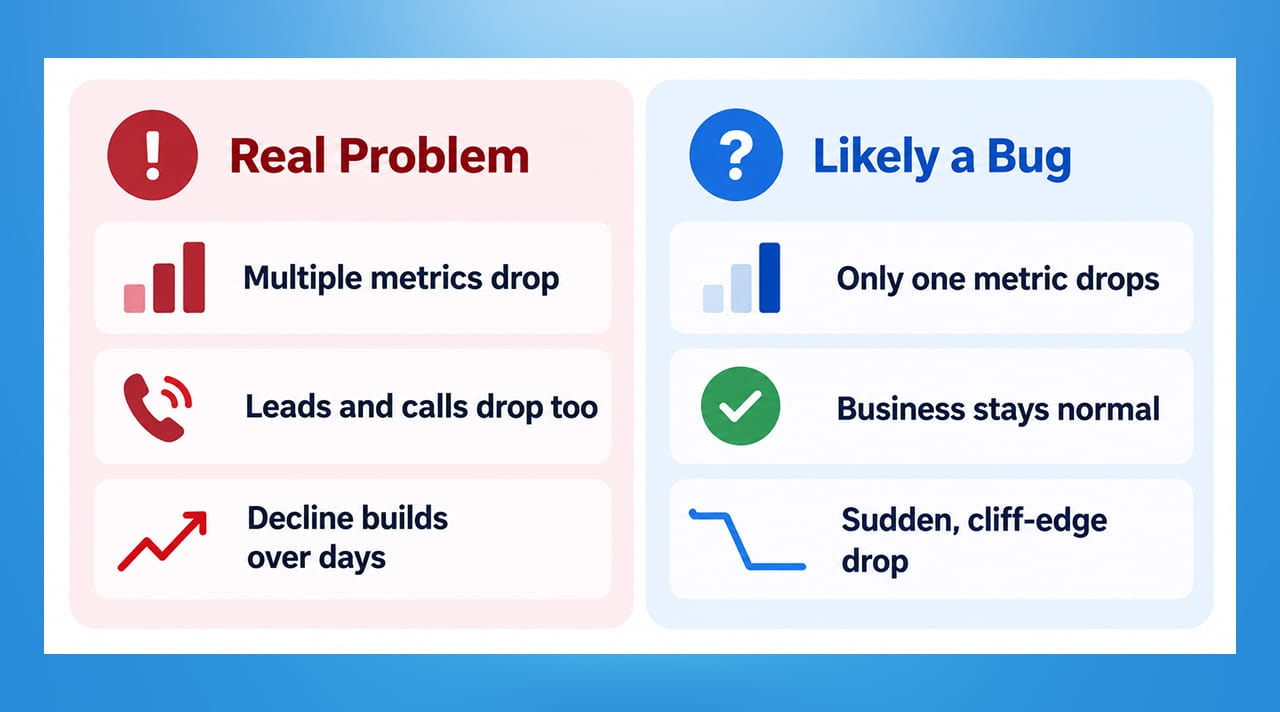
You won't always have the luxury of Google publicly confirming a bug within days. Here's a practical way to sanity-check a scary-looking number before assuming the worst:
- Check more than one metric. A logging bug usually affects one specific number (like impressions) while others (like clicks, or your actual sales and leads) stay normal. If your impressions crashed but your phone is still ringing and your contact form is still filling up, that's a strong clue the tool — not your business — is the problem.
- Check more than one source. Compare what Search Console shows against your website analytics (like Google Analytics), or even a different tool entirely. If Search Console says traffic collapsed but your analytics platform shows steady visitors, trust the platform showing consistency with reality.
- Look at the shape of the drop. A real ranking or traffic decline tends to build up or trend over days or weeks. A sudden, cliff-edge drop that appears in a narrow date range — especially on a newer or less-tested report — is a classic bug signature.
- Check Google's own status pages before assuming the worst. Google maintains a page listing known data anomalies in Search Console. It's worth a quick check before you or your team spend hours investigating a problem that doesn't exist.
- Give it a few days before reacting. Genuine algorithm changes tend to hold steady or keep evolving. Bugs tend to get quietly fixed and the numbers snap back to where they should be.
Why This Matters Beyond Just This One Bug
The real lesson here isn't about this specific glitch — it's about not making big decisions off a single chart. If a business had reacted to this bug by slashing its content budget, pausing its SEO efforts, or panicking to clients about a "collapse" in AI visibility, all of that would have been based on a number that was never real in the first place.
- Treat Search Console as one signal, not the whole picture. Leads, sales, phone calls, and actual conversions tell you more about real business impact than any single dashboard metric.
- Get comfortable asking "could this be a bug?" before "what did we do wrong?" It's a healthier first question, and it's often the right one.
- Have someone keeping an eye on your data regularly, whether in-house or through a digital marketing partner, so a bug like this gets flagged as unusual quickly instead of triggering unnecessary panic.
- Keep a simple record of your key numbers over time. Having your own historical record makes it much easier to spot when a number looks genuinely out of place.
Quick Takeaways
- Google confirmed a logging bug briefly under-reported "Generative AI" impressions in Search Console in mid-August 2026, scaring businesses into thinking their AI-search visibility had collapsed — it hadn't.
- This was one of at least two major Search Console reporting bugs in 2026, making it a genuinely confusing year for reading search performance data.
- A real problem usually shows up across multiple metrics and multiple sources; a bug usually shows up in just one number, in one report, appearing suddenly.
- Before reacting to a scary number, cross-check it against actual business outcomes — leads, calls, sales — not just the dashboard.
- Google maintains a public page of known Search Console data issues, which is worth checking before assuming the worst.
Not Sure If a Recent Drop in Your Numbers Is Real?
If you've seen a confusing dip in your search data recently and aren't sure whether to worry, we can help you tell the difference between a genuine issue and a reporting glitch. Reach out through our contact form and we'll take a proper look.
Outsourced365 Services are designed to help you grow
Contact us Today!
Why Companies Build Websites with Outsourced365
With our web design services, you will get:
- Modern, conversion-focused layouts
- Responsive design across all devices
- Optimized user experience and navigation
- Scalable websites built for growth

Related Posts
See all posts