Google Ads Just Made It Easier to Prove Online Ads Are Driving In-Store Sales — Here's What Changed
- September 29, 2026
-
365admin2015
- Outsourcing
 4 mins read
Tracking in-store sales from Google Ads has always been hard for local businesses. Here's a question that frustrates almost every business owner with a physical store: "Are my Google ads actually bringing people through the door, or are they just wasting money online?"
Until now, answering that question properly required stitching together data from your point-of-sale system, your CRM, and your Google Ads campaigns — usually with help from a developer. Google just made that a lot simpler. Here's what changed, and what it means for your store.
The Problem This Solves
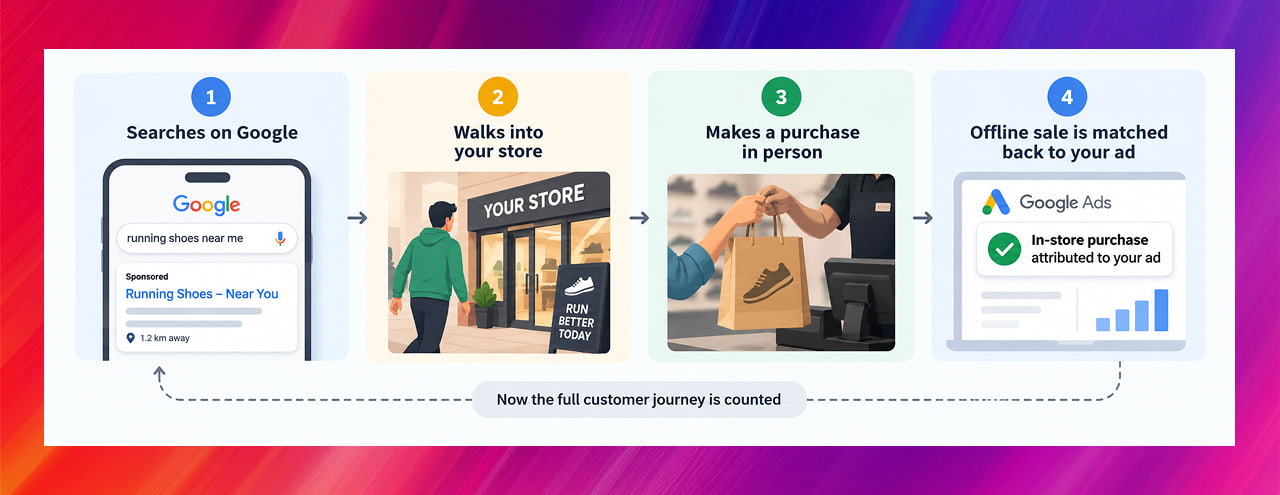
Picture this: someone searches "running shoes near me" on their phone, sees your Google ad, doesn't click "buy online" — they just walk into your shop that afternoon and buy a pair with cash.
From Google's side, that ad looks like it did nothing. No online sale was recorded. But it clearly worked — it got a paying customer through your door. This gap between "what an ad achieves in real life" and "what shows up in the ad platform's numbers" is one of the oldest headaches in advertising, especially for businesses that sell mostly or entirely in person.
Google Ads already had a way to close this gap, called Store Sales measurement — you connect your offline sales records (from your till, your CRM, wherever you track purchases) back to Google Ads so it can match them to the ads that led to them. The problem was that setting it up used to require fairly technical, developer-heavy data connections that most small and mid-sized businesses simply didn't have the resources for.
What Actually Changed
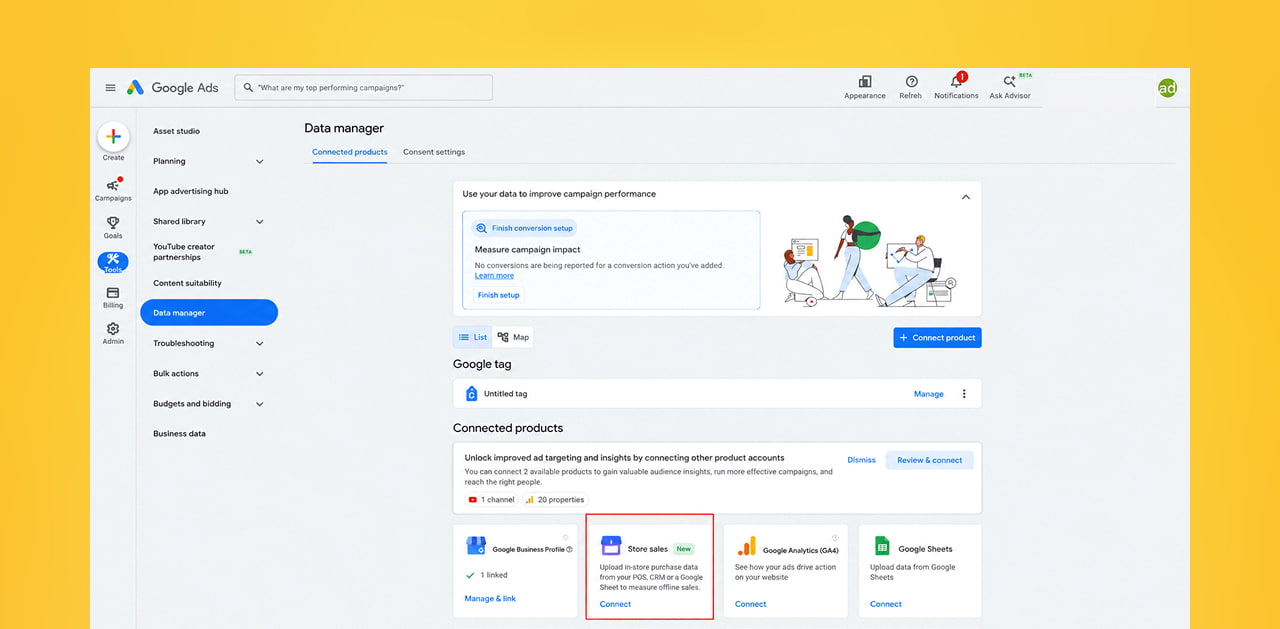
Google has simplified this connection significantly through a tool called Data Manager. In plain terms: businesses can now link their existing CRM or even a simple Google Sheet directly into Google Ads, instead of relying on the more complex technical setups that were previously required.
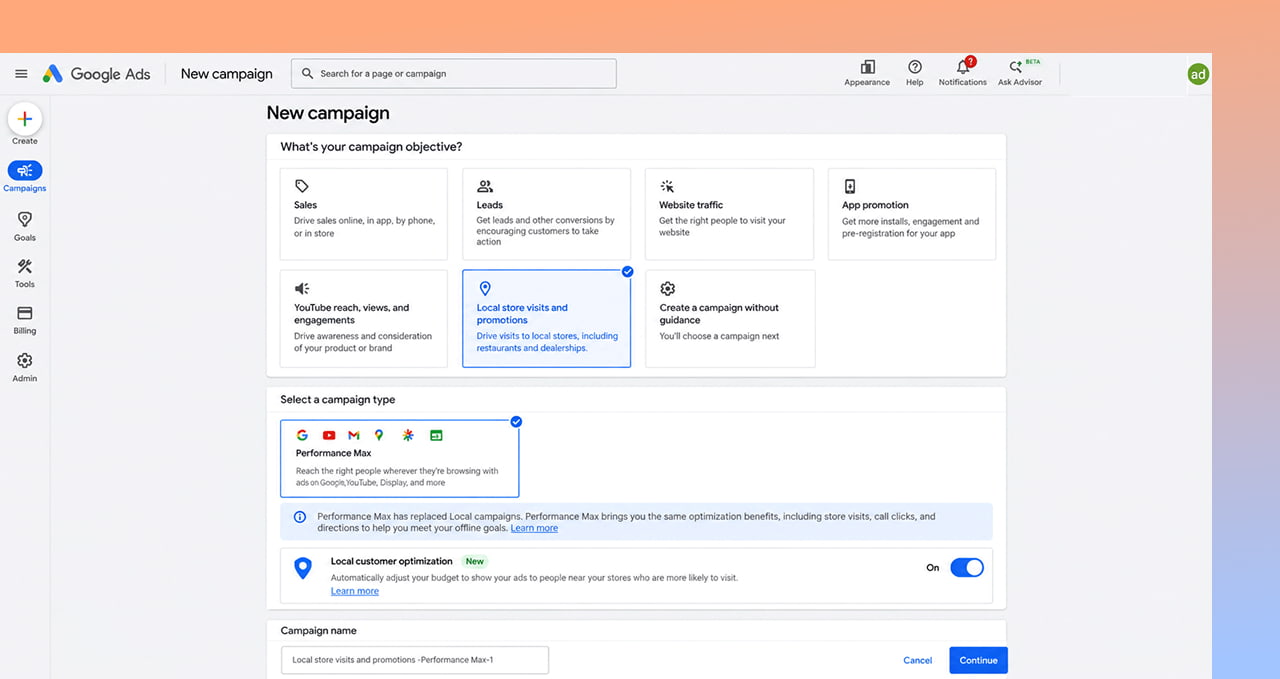
Alongside this, Google also introduced Local Customer Optimization, a straightforward on/off toggle inside Performance Max campaigns built for store goals. When it's switched on, Google shifts your ad budget toward reaching people who are physically nearby and actively looking for something like what you sell — right when they're most likely to actually walk in.
Put simply, these two updates work together:
- Local Customer Optimization helps you reach the right nearby people in the first place.
- Store Sales in Data Manager helps you prove, afterward, that those ads actually led to real purchases in your shop — using a spreadsheet or your existing CRM, not custom development work.
Why This Matters for Your Business
If you run a shop, showroom, clinic, salon, restaurant, or any business where the final sale happens in person, this closes a gap that's been costing you clarity (and probably budget) for years:
- You can finally see the real return on your ad spend. Instead of judging your Google Ads only by online sales or form fills, you can now factor in actual walk-in purchases too — which, for most local businesses, is the majority of revenue.
- You stop under-valuing "working" ads. Many businesses have paused or cut ad campaigns in the past because they "weren't converting online" — when in reality, they were quietly driving foot traffic that simply wasn't being counted.
- Setup no longer requires a developer. A Google Sheet with your sales data, uploaded through Data Manager, is now a legitimate way to close this loop — a big deal for smaller businesses without an in-house tech team.
How to Actually Use This
- Start tracking offline sales in a simple, consistent format — even a basic spreadsheet with date, amount, and (if possible) how the customer found you is a solid starting point.
- Connect that data through Data Manager so Google Ads can match your in-store sales back to the ad campaigns that likely influenced them.
- Turn on Local Customer Optimization if you're running Performance Max for store goals, so your budget is being prioritized toward nearby, ready-to-visit customers.
- If this feels like more than you want to manage in-house, a digital marketing partner can set up and monitor this tracking for you.
- Give it time before judging results. Matching offline purchases to ad clicks isn't instant — let a few weeks of data build up before drawing conclusions.
- Revisit campaigns you may have paused too early. If a campaign was cut in the past for "not converting," it may be worth a second look now that in-store sales can be factored in properly.
Quick Takeaways
- Google Ads has made it significantly easier to connect real, in-store sales data back to your online ad campaigns — no developer required, a CRM or Google Sheet is enough.
- A new toggle called Local Customer Optimization helps prioritize ad spend toward nearby customers who are ready to visit in person.
- This is especially valuable heading into the busy Q4 shopping season, when online research and in-store buying overlap the most.
- Businesses that judge ad performance only on online sales may be sitting on campaigns that are working better than the numbers currently show.
- The fix requires almost no technical setup — just a consistent way of recording your offline sales.
Not Sure If Your Ads Are Getting Full Credit for Your Walk-In Sales?
If your store depends on foot traffic and you've never connected your offline sales back to your ad campaigns, you're very likely underestimating what's actually working. Reach out through our contact form and we'll help you get this set up properly.
Outsourced365 Services are designed to help you grow
Contact us Today!
Why Companies Build Websites with Outsourced365
With our web design services, you will get:
- Modern, conversion-focused layouts
- Responsive design across all devices
- Optimized user experience and navigation
- Scalable websites built for growth

Related Posts
See all posts